Drag&Drop.html
<!DOCTYPE html>
<html lang="en">
<head>
    <meta charset="UTF-8">
    <meta http-equiv="X-UA-Compatible" content="IE=edge">
    <meta name="viewport" content="width=device-width, initial-scale=1.0">
    <title>Document</title>
    <style>
        /* 도화지 크기 설정 */
        html, body { padding: 0; margin: 0; width: 100%; height: 100%; }

        /* 공이 자유자재로 움직일 수 있도록 position을 'absolute'로 설정 */
        .ball { position: absolute; }
        /* 공을 선택했을 때, 그림자가 생기도록 설정 */
        .ball:hover { box-shadow: 0 0 10px 0 darkgray; cursor: pointer; }

        /* 공의 색상 설정 */
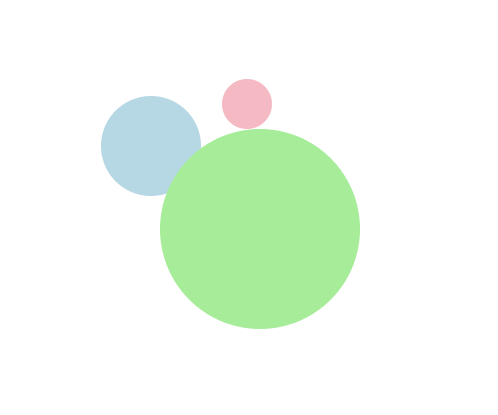
        .green { background-color: lightgreen; }
        .blue { background-color: lightblue; }
        .pink { background-color: lightpink }

        /* 공의 크기 설정 */
        .s200 { width: 200px; height: 200px; border-radius: 200px; }
        .s100 { width: 100px; height: 100px; border-radius: 100px; }
        .s50 { width: 50px; height: 50px; border-radius: 50px; }
    </style>
</head>
<body>
    <div class="ball green s200"></div>
    <div class="ball blue s100"></div>
    <div class="ball pink s50"></div>

    <script>
        // 공 선택 이벤트 핸들러
        function handleMouseDown(event){
        event.preventDefault();;

        const balls = document.querySelectorAll(".ball");
        const el = event.target;
        const classList = el.classList;

        if( !classList.contains("hold") ){
            // 공을 클릭했을 때, 마우스 커서의 XY좌표
            const mouseX = event.clientX;
            const mouseY = event.clientY;

            // 선택한 공의 XY좌표 (왼쪽 상단 모서리 기준)
            const ballPos = el.getBoundingClientRect();
            const ballX = ballPos.x;
            const ballY = ballPos.y;

            // 선택한 공 안에 있는 마우스 커서의 XY좌표
            const gapX = mouseX - ballX;
            const gapY = mouseY - ballY;

            el.setAttribute("gap-x", gapX);
            el.setAttribute("gap-y", gapY);

            // 선택한 공을 맨 앞으로 가지고 오기
            const maxPriority = (
            balls.length > 0
                ? Math.max.apply(null, Array.from(balls).map(ball=>ball.getAttribute("priority")))
                : 9999
            ) + 1;
            el.setAttribute("priority", maxPriority);
            el.style["z-index"] = maxPriority;

            // 선택한 공에 'hold' class를 추가
            classList.add("hold");
        }
        }

        // 공 움직임 이벤트 핸들러
        function handleMouseMove(event){
        event.preventDefault();

        const el = document.querySelector(".ball.hold");
        if( el ){
            // 움직이는 마우스 커서의 XY좌표
            const mouseX = event.clientX;
            const mouseY = event.clientY;

            // 선택한 공 안에 있는 마우스 커서의 XY좌표
            const gapX = el.getAttribute("gap-x");
            const gapY = el.getAttribute("gap-y");

            // 마우스 커서의 위치에 따른 공의 XY좌표
            const ballX = mouseX - gapX;
            const ballY = mouseY - gapY;

            // 공의 위치를 변경
            el.style.left = ballX+"px";
            el.style.top = ballY+"px";
        }
        }

        // 공 놓기 이벤트 핸들러
        function handleMouseUp(event){
        event.preventDefault();

        const el = document.querySelector(".ball.hold");
        if( el ){
            // 움직이면 적용된 속성 및 class를 삭제
            el.removeAttribute("gap-x")
            el.removeAttribute("gap-y")

            el.classList.remove("hold");
        }
        }
// ㅡㅡㅡㅡㅡㅡㅡㅡㅡㅡㅡㅡㅡㅡㅡㅡㅡㅡㅡㅡㅡㅡㅡㅡㅡㅡㅡㅡ
        const balls = document.querySelectorAll(".ball");

        balls.forEach(function(ball, idx){
        // 공의 우선순위 설정
        let priority = ball.getAttribute("priority");
        if( !priority ){
            priority = idx+1;
            ball.setAttribute("priority", priority);
        }
        ball.style["z-index"] = priority;

        // 공 선택 이벤트 바인딩
        ball.addEventListener('mousedown', handleMouseDown);
        });

        // 마우스 이벤트 바인딩
        document.addEventListener('mousemove', handleMouseMove);
        document.addEventListener('mouseup', handleMouseUp);

    </script>
</body>
</html>
wheel.html
<!DOCTYPE html>
<html lang="en">
<head>
    <meta charset="UTF-8">
    <meta http-equiv="X-UA-Compatible" content="IE=edge">
    <meta name="viewport" content="width=device-width, initial-scale=1.0">
    <title>Document</title>
    <style>
        body {
        min-height: 100vh;
        margin: 0;
        display: flex;
        align-items: center;
        justify-content: center;
        }

        div {
        width: 105px;
        height: 105px;
        background: #cdf;
        padding: 5px;
        }
    </style>
</head>
<body>
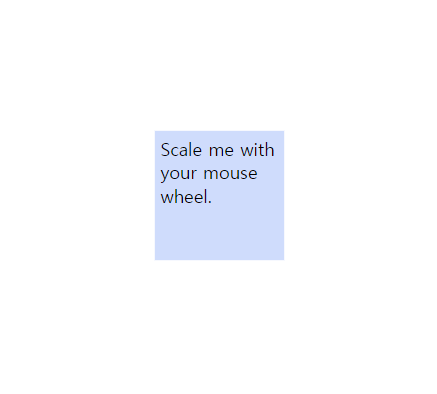
    <div>Scale me with your mouse wheel.</div>
    <script>
        function zoom(event) {
        event.preventDefault();

        scale += event.deltaY * -0.01;

        // Restrict scale
        scale = Math.min(Math.max(.125, scale), 4);

        // Apply scale transform
        el.style.transform = `scale(${scale})`;
        }

        let scale = 1;
        const el = document.querySelector('div');
        el.onwheel = zoom;
    </script>
</body>
</html>